Creating Local Claude Code Plugins

What I wanted (and why)
I'm on Windows primarily for my normal day to day… I know this is considered weird for many developers. I'm just a creature of habit. All my AI machines are running Linux but there's something that just makes me move faster in Windows.
With that I generally have to wait until support is added from the developer community on plugins, projects, etc. Not anymore with AI! The Ralph Wiggum loop is one of the coolest things I've tried out in a while, and I wanted access on my local work machine, however the issue is it's Bash scripts. Sure I could run it in WSL or Git Bash, but meh why not just use AI to do the entire conversion for me?
That was relatively simple which still feels so crazy to say in this day and age, the things we can do as creatives with an idea and some prompt structure is just amazing.
The next thing I had to figure out was how can I have this accessible at the user scope level so I could use it everywhere?
How can I run this?
You can start Claude Code with the plugin loaded automatically by passing in the path like so:
claude --plugin-dir ./my-first-plugin (from the docs)
This is the best way to test and just make sure the plugin is working as expected… but this isn't something you want to do every time.
The simplest solution: a local marketplace
I couldn't find this in the docs.. I stumbled upon it randomly searching, but to get around this you need to add your plugin to a marketplace. Fortunately a marketplace can live anywhere to include your personal machine. I ended up pushing it to GitHub with the thousands of others because I love tracking my contributions over the year of course.
- Source: https://github.com/loktar00/my-claude-plugins
The following is the structure of a plugin marketplace (a single json file), and a plugin.
my-claude-plugins/
├── loktar-marketplace/
│   ├── .claude-plugin/
│   │   └── marketplace.json
│   ├── my-first-plugin/
│   │   ├── .claude-plugin/
│   │   │   └── plugin.json
│   │   ├── commands/
│   │   │   └── hello.md
│   │   ├── hooks/
│   │   │   └── hooks.json
│   │   └── scripts/
│   │       └── hello.ps1
└── README.md
Marketplace manifest (marketplace.json)
This is really all you need it establishes your marketplace, who owns it, and any of the plugins being offered. What's most important (besides the obvious valid JSON) is the location of the plugins, I tried a few ways such as having the marketplace as a peer of the plugin directory, however what ended up working for me was putting the plugins under the marketplace.
{
  "name": "loktar-dev",
  "owner": { "name": "Jason" },
  "plugins": [
    {
      "name": "my-first-plugin",
      "source": "./my-first-plugin",
      "description": "TODO: one-line description"
    }
  ]
}
Now add the marketplace, launch Claude Code and type the following
/plugin marketplace add ./marketplace-name
In my case it was the following, and I was in the parent directory.
/plugin marketplace add ./loktar-dev
Claude Code Plugins
I'm not going to go in any detail about plugins here, honestly the official docs do a pretty good job of describing them, and the plugins that exist are great examples. The issue I was facing was all about getting them installed easily so I could access in all instances.
Installing at user scope (no admin)
As long as you have the above setup you can launch Claude Code, type /plugins move over to marketplaces and you should see yours show up.
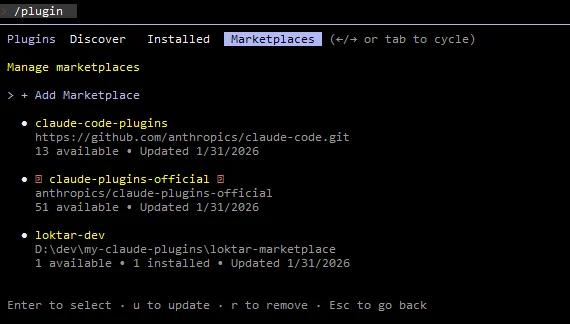
Select your marketplace and you should see your plugin ready to install
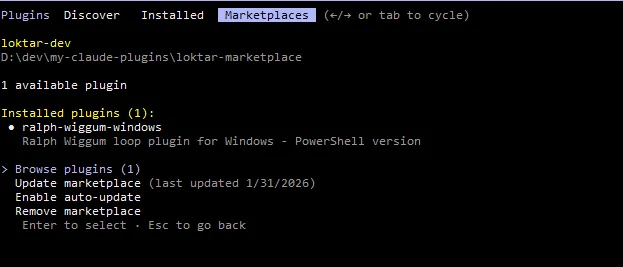
Select the plugin and install for your user.
Now you should have access to the plugin in any instance you open, such as > /ralph-wiggum-windows:help in this example.
Troubleshooting and Gotchas
If you don't see the plugin you should see an error, the beauty of it all is you can ask Claude Code what's going on. In general it's a pathing or unexpected formatting of the JSON.
Closing
Things are moving so fast, that this article is already out of date, Ralph Wiggum isn't even the cool hot thing anymore, it's been a week, however the principles will be the same regardless. There's always a problem to solve and if you can ask the right questions the barrier is incredibly low to create or have solutions created.